GEPCO Online Bill Check is the official online method used by consumers of Gujranwala Electric Power Company to view their current electricity bill through the centralized PITC billing system. This service allows users to access their latest bill using a 14 digit Reference Number without visiting a GEPCO office or waiting for a printed copy to arrive.
Check Your GEPCO Bill
What is GEPCO Online Bill Check
GEPCO Online Bill Check is a digital billing service provided through the Power Information Technology Company platform. PITC is the central authority responsible for managing electricity billing data for distribution companies operating under the WAPDA billing system.
GEPCO, formally known as Gujranwala Electric Power Company, serves electricity consumers across multiple districts in Punjab. All consumer billing data for GEPCO is generated, stored, and maintained in the PITC system. The online bill check facility pulls live data directly from this system.
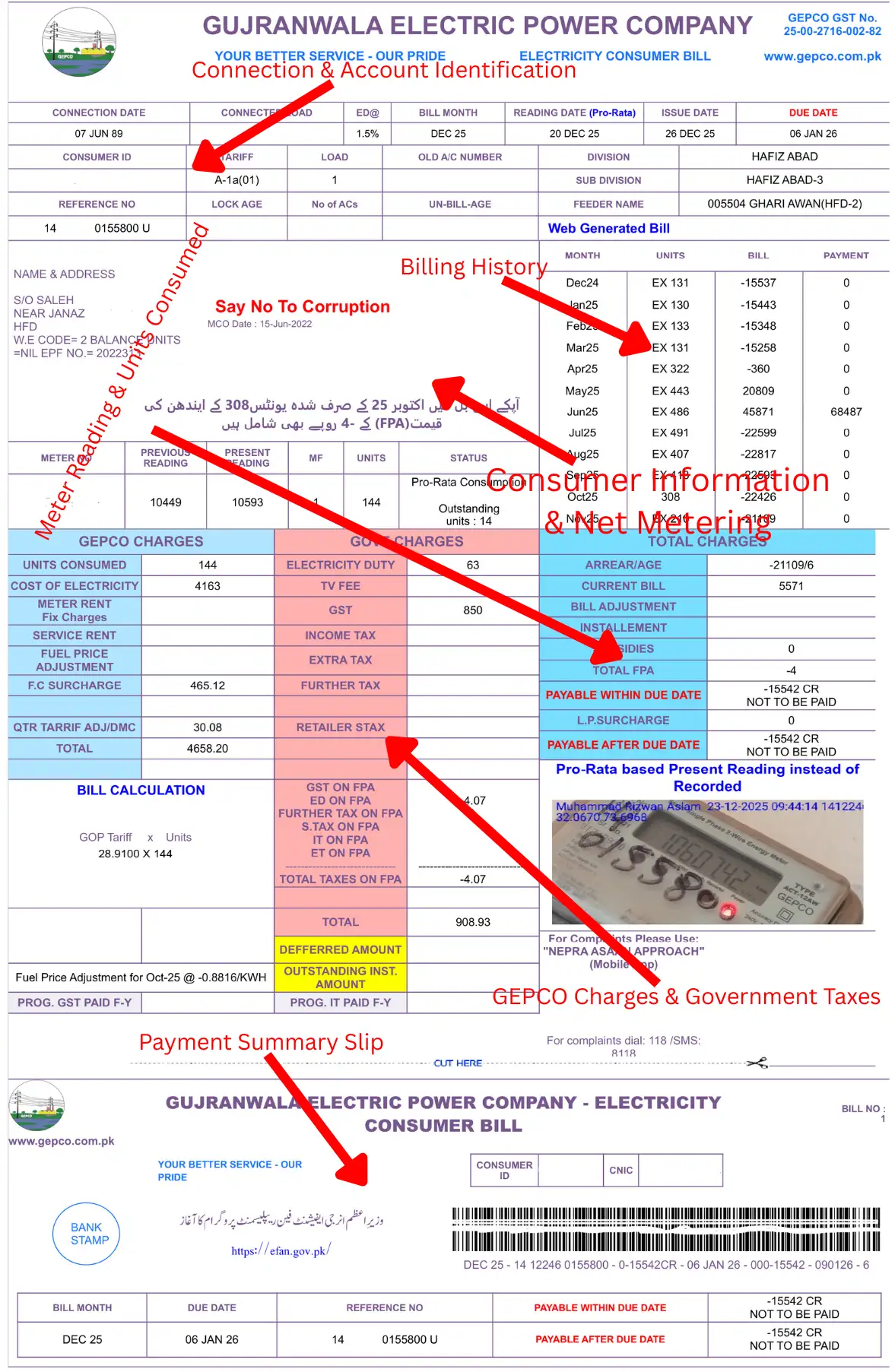
When a user enters a valid Reference Number, the system retrieves the most recent bill issued for that connection. This includes domestic, commercial, and other consumer categories. The bill shown online is not a summary or estimate. It is the same bill that is printed and delivered physically.
Key characteristics of the GEPCO Online Bill system include:
- Access limited to the current billing month.
- Bills retrieved directly from PITC records.
- Identical structure and figures to the printed bill.
- Official bill format accepted by banks and payment channels.
- Automatic inclusion of arrears from unpaid previous bills.
This structure ensures consistency across all billing channels. Whether a consumer views the bill online or receives a printed copy, the information remains the same.
How to Check GEPCO Bill Online
Checking your GEPCO Online Bill requires only one piece of information: the 14 digit Reference Number assigned to your electricity connection. This number uniquely identifies your account in the PITC database.
The process is straightforward and follows a fixed sequence.
Step 1: Find Your Reference Number
The Reference Number is printed on every GEPCO electricity bill. It is usually located near the top section of the bill and consists of 14 digits without spaces.
Important points about the Reference Number:
- It is different from the Consumer ID.
- It does not change every month.
- It remains the same as long as the meter and connection remain unchanged.
- It is required for online bill viewing and duplicate bill generation.
If you have a previous bill copy, use the Reference Number printed on it. If you do not have any bill available, you must obtain the Reference Number from GEPCO records before using the online system.
Step 2: Enter the Reference Number
Once you have the Reference Number, enter it exactly as printed. Avoid adding spaces or extra digits. Even a single incorrect digit will prevent the system from finding your bill.
The system does not accept Consumer ID as a replacement for the Reference Number on most public bill viewing portals. Always prioritize the Reference Number unless the interface explicitly allows Consumer ID input.
Step 3: Submit the Request
After entering the Reference Number, submit the request. The system queries the PITC database in real time. If a bill has been issued for the current billing cycle, it will be retrieved immediately.
If the billing cycle is still in progress or the bill has not yet been generated, the system may show no record temporarily.
Step 4: View the Current Bill
Once retrieved, the current month GEPCO Online Bill is displayed on screen. It includes all standard bill components, charges, dates, and billing history.
Below is a simplified overview of the key fields shown on a typical GEPCO Online Bill.
| Bill Field | Description |
| Reference Number | Unique 14 digit identifier for the electricity connection |
| Consumer ID | Internal customer identification number used by GEPCO |
| Billing Month | Month and year for which the bill is issued |
| Current Charges | Electricity charges for the current billing period |
| Due Date | Last date for payment without surcharge |
| Payable Amount | Total amount payable including arrears if any |
This information should match the printed bill exactly once it is dispatched.
Understanding Your GEPCO Online Bill
A GEPCO Online Bill contains several fields that may appear technical at first glance. Understanding these fields helps consumers verify charges and avoid confusion.
The following explanations cover the most relevant bill components shown in the online bill view.
Reference Number
The Reference Number is the primary identifier of your electricity connection in the PITC system. It links your meter, billing history, and consumption records.

This number should be used for all online bill-related activities. It remains constant across billing months unless the connection is officially altered.
Consumer ID
The Consumer ID is an internal number used by GEPCO for administrative purposes. While it appears on the bill, it is not always accepted as an input for online bill checking. It is mainly used in internal records and correspondence.

Billing Month
The Billing Month indicates the period for which electricity usage has been calculated. It usually reflects the month when meter readings were taken, not necessarily the month when the bill is paid.
For example, a bill generated in early August may reflect consumption for July.
Current Charges
Current Charges represent the cost of electricity consumed during the billing period. This includes units consumed and applicable charges calculated according to the approved tariff.
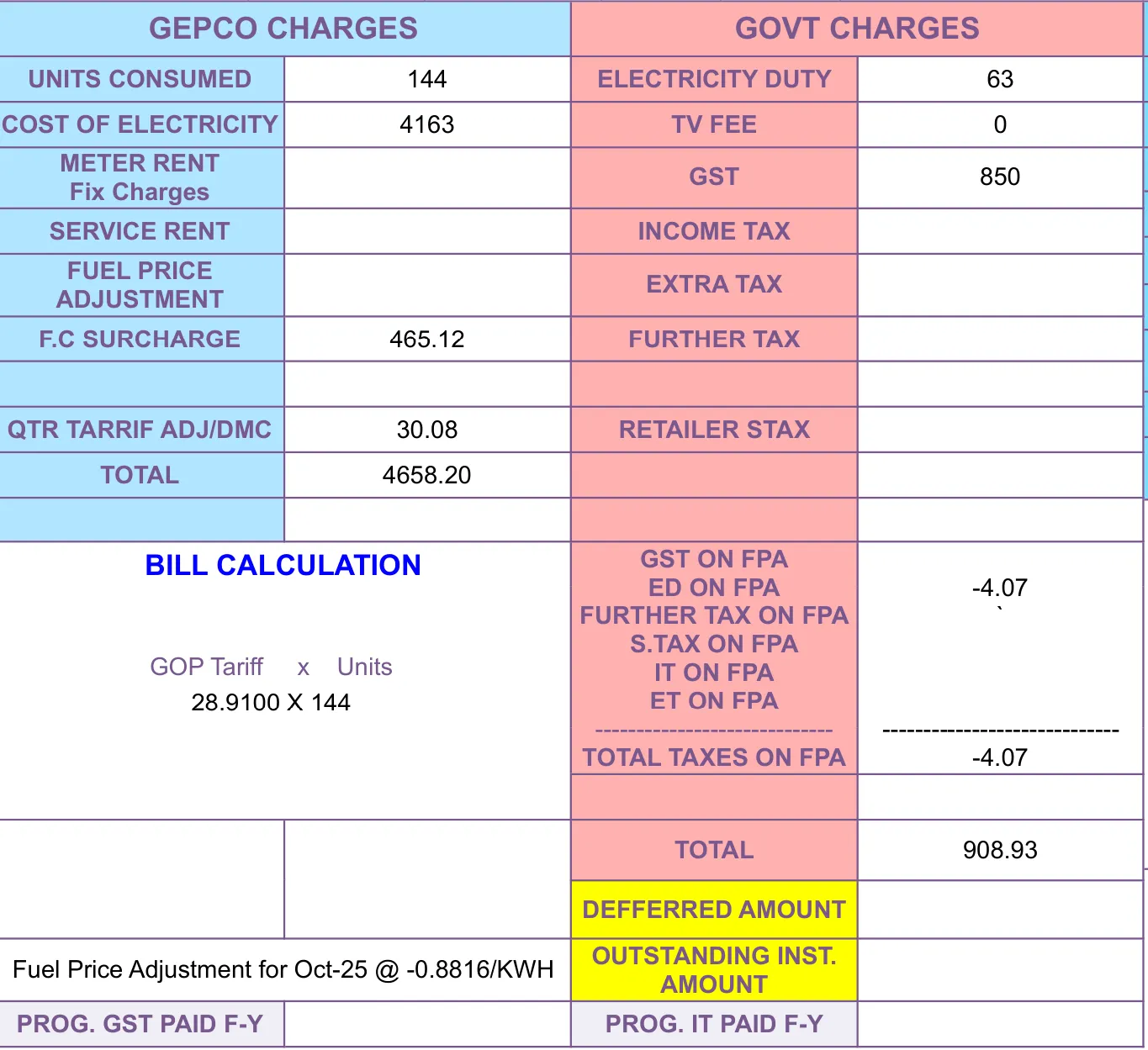
This amount does not include unpaid balances from previous months.
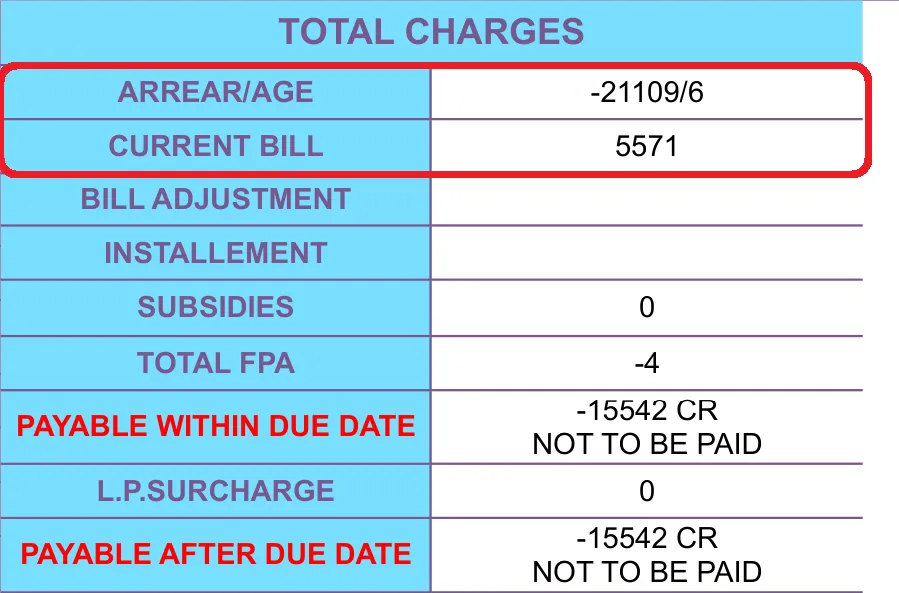
Arrears
Arrears represent unpaid amounts from earlier billing periods. If a previous bill was not paid in full, the outstanding amount is automatically added to the current bill as arrears.
Important rules regarding arrears:
- Arrears are carried forward automatically.
- Separate PDFs for previous unpaid bills are not available.
- The online system does not allow downloading old bills individually.
- The current bill always reflects the total outstanding balance.
Due Date
The Due Date is the last date to pay the bill without incurring a late payment surcharge. This date is fixed and shown clearly on the bill.
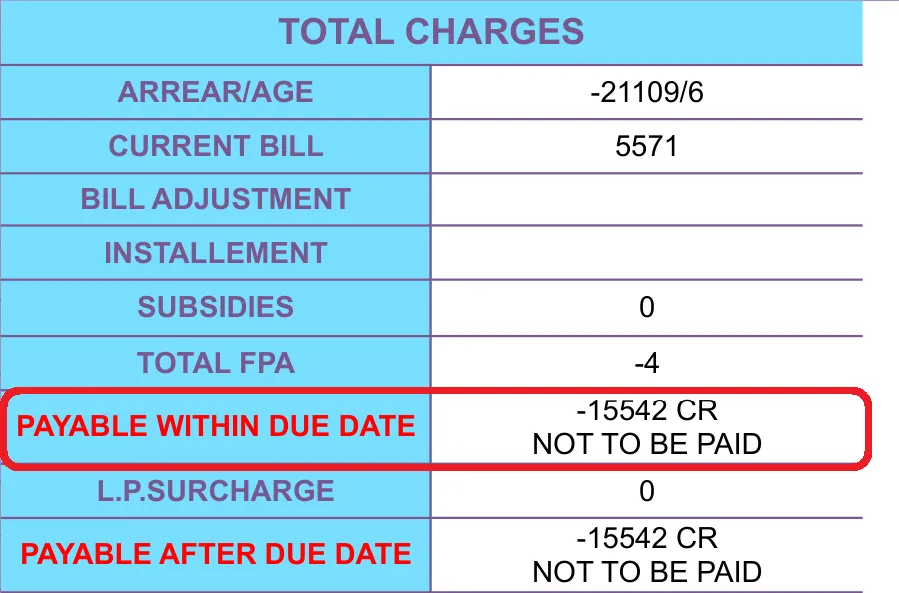
The system does not adjust the due date based on when the bill is viewed online.
Payable Amount
The Payable Amount is the total amount that must be paid by the due date. It includes:
- Current Charges.
- Arrears from previous unpaid bills.
- Any applicable adjustments already applied by GEPCO.
This is the amount consumers should rely on when planning payment.
Billing and Payment History
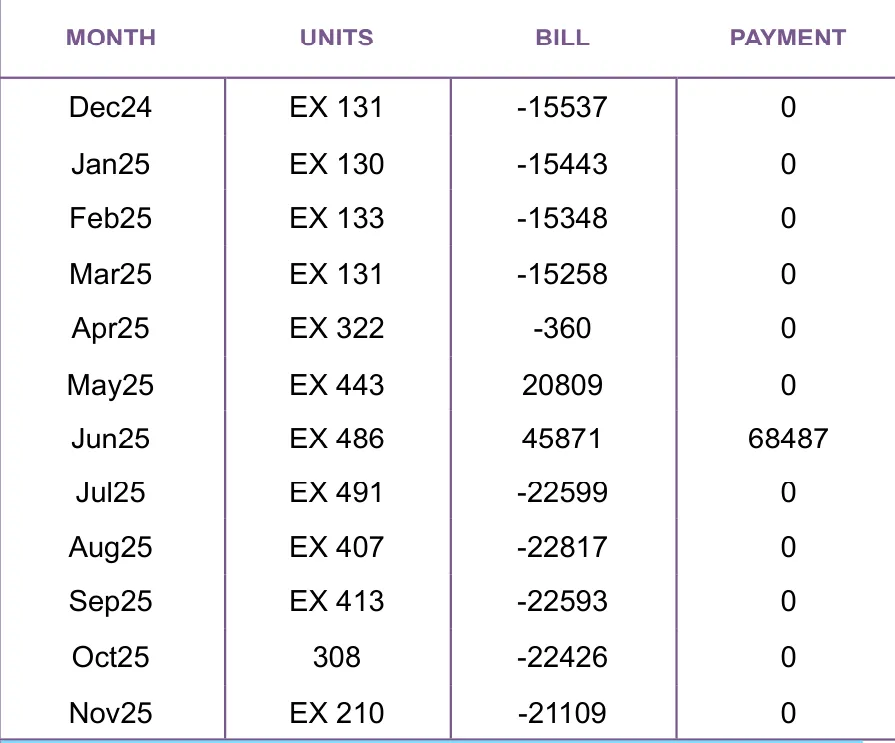
The current GEPCO Online Bill includes a summary section showing billing and payment history for up to the last 12 months. This section provides:
- Month wise billed amounts.
- Payment status for each month.
- Amounts paid against each bill.
This history is for reference only. It does not provide downloadable copies of old bills.
Download or Print GEPCO Duplicate Bill
The GEPCO Online Bill system allows users to download or print a duplicate copy of the current month’s bill. This duplicate bill is generated directly from PITC records and is considered an official document.
PDF Bill Availability
Only the current month bill can be downloaded as a PDF Bill. The system does not provide separate PDF files for previous months.
Key points to understand:
- The PDF format is identical to the printed bill.
- It includes the official layout used by GEPCO.
- It contains the same Reference Number and billing data.
- It is accepted for record keeping and verification.
Printing the Bill
Once downloaded, the PDF bill can be printed on standard paper. Printed duplicate bills are valid for reference and payment purposes, as they originate from the official PITC system.
Rules About Previous Bills
Consumers often expect to download older bills individually. The online system does not support this.
The following rules apply:
- Previous month bills cannot be downloaded separately.
- If a bill was unpaid, its amount appears as arrears in the current bill.
- The current bill includes a 12 month billing and payment record.
- For an actual copy of an older bill, consumers must contact GEPCO through official channels.
This structure ensures that billing records remain consistent and controlled by the distribution company.
Is the GEPCO Online Bill Official
Yes. The GEPCO Online Bill retrieved through the PITC system is official and authentic.
PITC operates as the centralized billing authority for electricity distribution companies working under the WAPDA billing system. All billing data originates from meter readings processed through this system.
Reasons the online bill is considered official:
- Data is pulled directly from PITC databases.
- The bill format matches the printed GEPCO bill.
- Figures are identical to those used for payment processing.
- Reference Number validation is enforced by the system.
- Banks and payment channels rely on the same billing data.
There is no separate or unofficial version of the GEPCO bill in the system. Any discrepancy between an online bill and a printed bill usually indicates a timing issue, such as viewing the bill before final dispatch.
Common Problems When Checking GEPCO Bill
While the system is generally reliable, users may encounter issues when checking their GEPCO Online Bill. Most problems are related to input errors or billing cycle timing.
Data Not Found
This usually occurs when:
- The bill for the current month has not yet been generated.
- The Reference Number is entered incorrectly.
- The billing cycle for the area is still in progress.
In such cases, waiting a few days and rechecking often resolves the issue.
Wrong Reference Number
Using an incorrect or incomplete Reference Number will result in no record found. Always verify the number from a previous bill and avoid guessing digits.
Delayed Billing
In some areas, bill generation may be delayed due to operational reasons. During this time, the system will not show the new bill even if the previous month’s bill is visible.
Confusion About Old Bills
Users sometimes assume that missing previous bills indicate a system error. In reality, the system is designed to show only the current month bill. Older bills are reflected through arrears and billing history, not separate downloads.
Understanding these limitations helps avoid unnecessary concern.
FAQs About GEPCO Online Bill Check
Can I check my GEPCO bill without a Reference Number
No. The Reference Number is required to retrieve the bill from the PITC system. Without it, the bill cannot be accessed online.
Is Consumer ID the same as Reference Number
No. They are different identifiers. The Reference Number is used for public bill checking, while Consumer ID is mainly for internal use.
Why can I not download last month’s bill
The system only allows downloading the current month’s bill. Previous bills are not available as separate PDFs.
Where can I see my old billing details
The current bill includes a 12 month billing and payment history section that summarizes past records.
What happens if I did not pay my previous bill
Any unpaid amount is automatically added to the current bill as arrears.
Is the online bill valid for records
Yes. The GEPCO Online Bill generated through PITC is official and matches the printed bill.
Why does my payable amount look higher than expected
This usually happens when arrears from previous unpaid bills are included in the current payable amount.
Conclusion
GEPCO Online Bill Check provides a direct and official way to view your current electricity bill using the PITC billing system. By entering a valid 14 digit Reference Number, consumers can access the same bill data used by Gujranwala Electric Power Company under the WAPDA billing system.
The service is limited by design to the current billing month. Only the latest bill can be viewed, downloaded, and printed as a PDF. Any unpaid previous amounts are carried forward as arrears and reflected clearly in the current bill, along with a 12 month billing history for reference.
For users who need to quickly verify charges, due dates, and payable amounts, the GEPCO Online Bill system remains the most accurate and reliable source of billing information.